

- Fetch history — pull previous messages for a conversation using async nodes
- Real-time push — listen for new messages as they arrive via the
OnMessageReceiveddelegate
How Messages Flow
Fetch User Messages
Retrieve the message history for a 1:1 conversation.- Blueprint
- C++
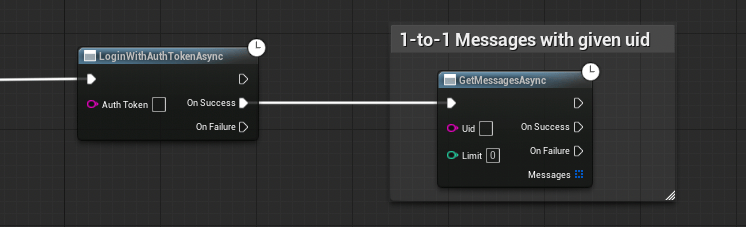
On Success returns a
TArray<FCometChatMessage> — an array of messages sorted by timestamp.Fetch Group Messages
Retrieve the message history for a group conversation, with pagination support.- Blueprint
- C++
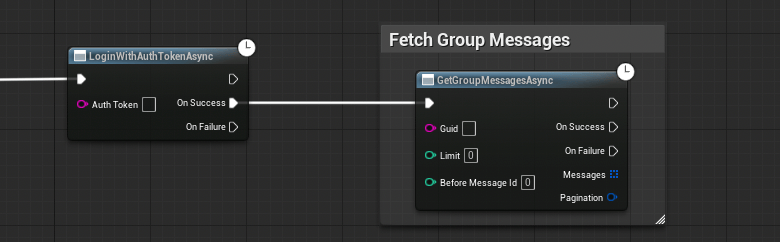
On Success returns two outputs:
TArray<FCometChatMessage>— the messages for this pageFCometChatPagination— pagination metadata includingHasMoreandNextCursor
Pagination
TheFCometChatPagination struct tells you where you are in the message history:
Real-Time: Incoming Messages
To receive messages as they arrive (without polling), bind to theOnMessageReceived delegate on the Subsystem.
- Blueprint
- C++
- Get a reference to the CometChat Subsystem
- Drag off and search for On Message Received
- Use Bind Event to connect it to a custom event
- The custom event receives an
FCometChatMessageparameter
The
OnMessageReceived delegate fires for all conversations — both 1:1 and group. Use ReceiverType to distinguish between them, and ConversationId to route messages to the right chat window.Next Steps
Users
Fetch user profiles and track presence.
Groups
Create, join, and leave groups.
Real-Time Events
All five real-time delegates explained in detail.