

UCometChatSubsystem exposes 40+ multicast delegates organized by listener type. All delegates fire on the Game Thread, so you can safely update UI directly.
Event Flow
Binding Delegates
- Blueprint
- C++
- Get a reference to the CometChat Subsystem
- Drag off the Subsystem pin and search for the delegate name (e.g., On Text Message Received)
- Select Bind Event to wire it to a custom event node
- The custom event automatically gets the correct parameter type
MessageListener Events
These fire when messages, typing indicators, receipts, or reactions arrive.- Blueprint
- C++
Bind to On Text Message Received. The custom event receives an
FCometChatMessage. Use ReceiverType to check if it’s a user (1:1) or group message.UserListener Events
These fire when a user’s online status changes.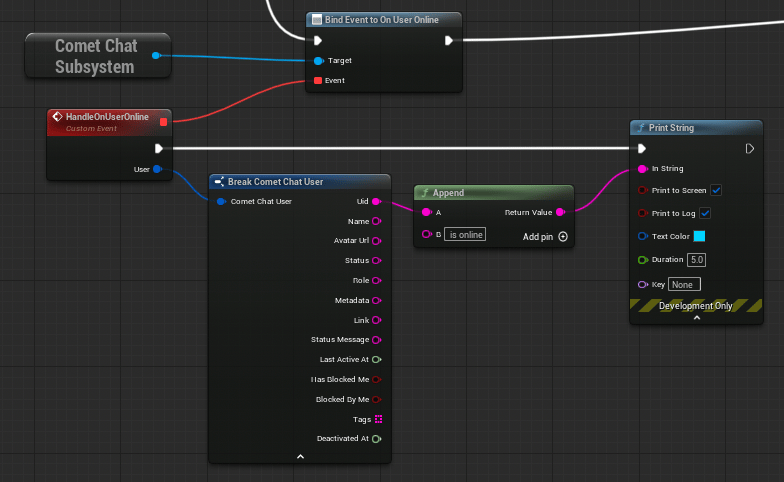
- Blueprint
- C++
Bind to On User Online / On User Offline. The custom event receives an
FCometChatUser with the user’s full profile.GroupListener Events
These fire when group membership changes occur.- Blueprint
- C++
Bind to On Group Member Joined. The custom event receives the action, the user who joined, and the group.
ConnectionListener Events
These fire when the WebSocket connection state changes.- Blueprint
- C++
Bind to On Connected, On Disconnected, etc. These are parameterless events (except
OnConnectionError which provides an FCometChatError).LoginListener Events
These fire on login/logout lifecycle events.- Blueprint
- C++
Bind to On Login Success to receive the logged-in
FCometChatUser after authentication completes.AIAssistantListener Events
These fire when AI assistant interactions occur.- Blueprint
- C++
Bind to On AI Assistant Event. The custom event receives an
FCometChatAIAssistantEvent with event type, data, conversation ID, and sender UID.Error Handling — FCometChatError
Many delegates and failure callbacks provide anFCometChatError struct with details about what went wrong. Always handle errors gracefully in your game.
FCometChatError
Handling Errors
- Blueprint
- C++
All async nodes have an On Failure pin. Wire it to a custom event that receives an
FString error message. Connection and login listener events provide the full FCometChatError struct.Manual Connection
By default, the SDK auto-connects the WebSocket after login. For games with loading screens or lobbies where real-time events aren’t needed immediately, you can manage the connection manually.Setup Manual Mode
SetbAutoEstablishSocketConnection = false in FCometChatAppSettings when configuring:
Connect / Disconnect / Ping
- Blueprint
- C++
- Connect Async — Establish the WebSocket after login
- Disconnect Async — Close the WebSocket (user stays authenticated)
- Ping Async — Verify the connection is alive
Query Connection State
For full details on manual connection management, see Advanced Configuration.
Next Steps
Typing Indicators
Send and receive typing state.
UI Components
Drop-in chat panel and button widgets.