> ## Documentation Index
> Fetch the complete documentation index at: https://cometchat-22654f5b-feature-android-multimedia-attachments.mintlify.site/llms.txt
> Use this file to discover all available pages before exploring further.
# Message List
> Scrollable list of messages for a conversation with real-time updates, reactions, threaded replies, and message actions.
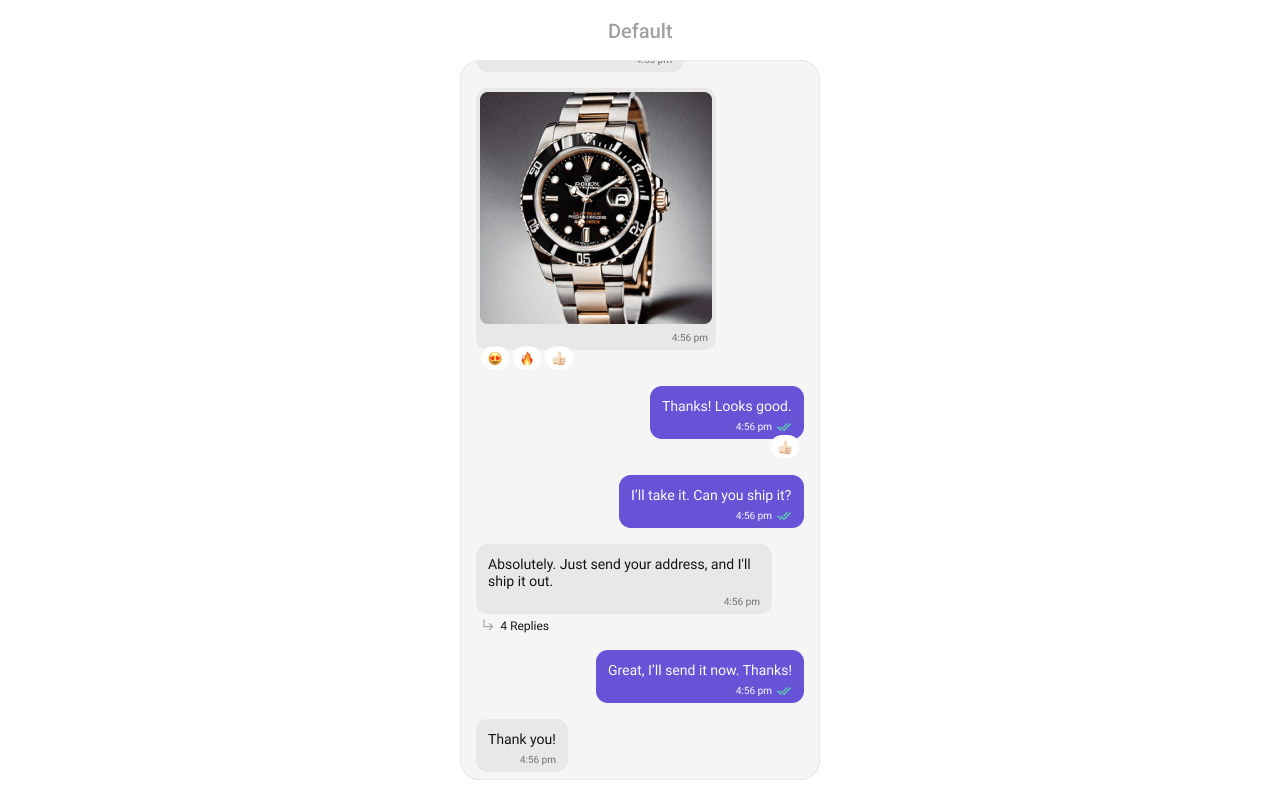
`CometChatMessageList` renders a scrollable list of messages for a conversation with real-time updates for new messages, edits, deletions, reactions, and threaded replies.
 ***
## Where It Fits
`CometChatMessageList` is a message display component. It requires either a `User` or `Group` object to fetch and render messages. Wire it with `CometChatMessageHeader` and `CometChatMessageComposer` to build a complete messaging layout.
```xml activity_chat.xml lines theme={null}
```
```kotlin lines theme={null}
val messageList = findViewById(R.id.message_list)
messageList.setUser(user)
```
```kotlin lines theme={null}
CometChatMessageList(
user = user
)
```
***
## Quick Start
Add to your layout XML:
```xml lines theme={null}
```
Set a `User` or `Group` — this is required:
```kotlin lines theme={null}
override fun onCreate(savedInstanceState: Bundle?) {
super.onCreate(savedInstanceState)
setContentView(R.layout.your_layout)
val messageList = findViewById(R.id.message_list)
messageList.setUser(user)
// or messageList.setGroup(group)
}
```
```kotlin lines theme={null}
@Composable
fun MessagesScreen() {
CometChatMessageList(
user = user
// or group = group
)
}
```
Prerequisites: CometChat SDK initialized with `CometChatUIKit.init()`, a user logged in, and the UI Kit dependency added.
Simply adding the `MessageList` component to the layout will only display the loading indicator. You must supply a `User` or `Group` object to fetch messages.
***
## Filtering
Pass a `MessagesRequest.MessagesRequestBuilder` to control what loads:
```kotlin lines theme={null}
messageList.setMessagesRequestBuilder(
MessagesRequest.MessagesRequestBuilder()
.setSearchKeyword("hello")
.setLimit(30)
)
```
```kotlin lines theme={null}
CometChatMessageList(
user = user,
messagesRequestBuilder = MessagesRequest.MessagesRequestBuilder()
.setSearchKeyword("hello")
.setLimit(30)
)
```
### Filter Recipes
| Recipe | Builder method |
| --------------------- | ---------------------------- |
| Search by keyword | `.setSearchKeyword("hello")` |
| Filter by UID | `.setUID("user_uid")` |
| Filter by GUID | `.setGUID("group_guid")` |
| Limit per page | `.setLimit(30)` |
| Unread only | `.setUnread(true)` |
| Hide deleted messages | `.hideDeletedMessages(true)` |
Pass the builder object, not the result of `.build()`. The component calls `.build()` internally.
***
## Actions and Events
### Callback Methods
#### `onThreadRepliesClick`
Fires when a user taps a threaded message bubble.
```kotlin lines theme={null}
messageList.setOnThreadRepliesClick { context, baseMessage, template ->
// Navigate to thread view
}
```
```kotlin lines theme={null}
CometChatMessageList(
user = user,
onThreadRepliesClick = { context, baseMessage, template ->
// Navigate to thread view
}
)
```
#### `onError`
Fires on internal errors (network failure, auth issue, SDK exception).
```kotlin lines theme={null}
messageList.setOnError { exception ->
Log.e("MessageList", "Error: ${exception.message}")
}
```
```kotlin lines theme={null}
CometChatMessageList(
user = user,
onError = { exception ->
Log.e("MessageList", "Error: ${exception.message}")
}
)
```
#### `onLoad`
Fires when the list is successfully fetched and loaded.
```kotlin lines theme={null}
messageList.setOnLoad { messages ->
Log.d("MessageList", "Loaded ${messages.size}")
}
```
```kotlin lines theme={null}
CometChatMessageList(
user = user,
onLoad = { messages ->
Log.d("MessageList", "Loaded ${messages.size}")
}
)
```
#### `onEmpty`
Fires when the list is empty after loading.
```kotlin lines theme={null}
messageList.setOnEmpty {
Log.d("MessageList", "No messages")
}
```
```kotlin lines theme={null}
CometChatMessageList(
user = user,
onEmpty = { /* no messages */ }
)
```
### SDK Events (Real-Time, Automatic)
The component listens to SDK message events internally. No manual setup needed.
> Automatic: new messages, edits, deletions, and reactions update the list in real time.
***
## Functionality
| Method (Kotlin XML) | Compose Parameter | Description |
| ------------------------------------ | ---------------------------------- | --------------------------------------------------------------------------------------------------------------------------------------------- |
| `setUser(user)` | `user = user` | Set user for 1-on-1 conversation |
| `setGroup(group)` | `group = group` | Set group for group conversation |
| `setHideLoadingState(true)` | `hideLoadingState = true` | Hide loading indicator |
| `setHideEmptyState(true)` | `hideEmptyState = true` | Hide empty state view |
| `setHideErrorState(true)` | `hideErrorState = true` | Hide error state view |
| `setStartFromUnreadMessages(true)` | `startFromUnreadMessages = true` | Scroll to first unread on load |
| `setLoadLastAgentConversation(true)` | `loadLastAgentConversation = true` | Load last agent conversation |
| `setMessagesRequestBuilder(builder)` | `messagesRequestBuilder = builder` | Custom message request builder |
| `setBubbleFactories(list)` | `bubbleFactories = list` | Set custom bubble factories for message types |
| `setOnThreadRepliesClick { }` | `onThreadRepliesClick = { }` | Thread reply tap callback |
| `setEnableMultipleAttachments(true)` | `enableMultipleAttachments = true` | Render multi-attachment messages with per-type bubbles and batch grouping (default `true`). See [Multiple Attachments](#multiple-attachments) |
***
## Multiple Attachments
Media messages that carry multiple attachments render with dedicated per-type bubbles — an image grid for images, a video grid for videos, a stacked player list for audio files, and a connected card stack for documents (see [Message Bubble Styling](/ui-kit/android/v6/message-bubble-styling) for each one).
When a single composer send is split into several messages (one per attachment type), the list **groups them visually as one batch**: the avatar and sender name appear only on the first message of the batch, the timestamp and read receipt only on the last, while reactions stay per message. Grouping is derived from list-neighbor adjacency on the `batchId` the composer stamps on each message — there are no separate index/count keys. A mic-recorded voice note carries a `voice_note` marker and always renders standalone, never grouped.
The behavior is on by default and can be toggled:
```kotlin lines theme={null}
val messageList = findViewById(R.id.message_list)
messageList.setEnableMultipleAttachments(true) // default
```
```kotlin lines theme={null}
CometChatMessageList(
user = user,
enableMultipleAttachments = true // default
)
```
Setting it to `false` renders every media message with the classic single-attachment bubbles instead.
***
## Custom View Slots
### Header View
Custom view displayed at the top of the message list.
***
## Where It Fits
`CometChatMessageList` is a message display component. It requires either a `User` or `Group` object to fetch and render messages. Wire it with `CometChatMessageHeader` and `CometChatMessageComposer` to build a complete messaging layout.
```xml activity_chat.xml lines theme={null}
```
```kotlin lines theme={null}
val messageList = findViewById(R.id.message_list)
messageList.setUser(user)
```
```kotlin lines theme={null}
CometChatMessageList(
user = user
)
```
***
## Quick Start
Add to your layout XML:
```xml lines theme={null}
```
Set a `User` or `Group` — this is required:
```kotlin lines theme={null}
override fun onCreate(savedInstanceState: Bundle?) {
super.onCreate(savedInstanceState)
setContentView(R.layout.your_layout)
val messageList = findViewById(R.id.message_list)
messageList.setUser(user)
// or messageList.setGroup(group)
}
```
```kotlin lines theme={null}
@Composable
fun MessagesScreen() {
CometChatMessageList(
user = user
// or group = group
)
}
```
Prerequisites: CometChat SDK initialized with `CometChatUIKit.init()`, a user logged in, and the UI Kit dependency added.
Simply adding the `MessageList` component to the layout will only display the loading indicator. You must supply a `User` or `Group` object to fetch messages.
***
## Filtering
Pass a `MessagesRequest.MessagesRequestBuilder` to control what loads:
```kotlin lines theme={null}
messageList.setMessagesRequestBuilder(
MessagesRequest.MessagesRequestBuilder()
.setSearchKeyword("hello")
.setLimit(30)
)
```
```kotlin lines theme={null}
CometChatMessageList(
user = user,
messagesRequestBuilder = MessagesRequest.MessagesRequestBuilder()
.setSearchKeyword("hello")
.setLimit(30)
)
```
### Filter Recipes
| Recipe | Builder method |
| --------------------- | ---------------------------- |
| Search by keyword | `.setSearchKeyword("hello")` |
| Filter by UID | `.setUID("user_uid")` |
| Filter by GUID | `.setGUID("group_guid")` |
| Limit per page | `.setLimit(30)` |
| Unread only | `.setUnread(true)` |
| Hide deleted messages | `.hideDeletedMessages(true)` |
Pass the builder object, not the result of `.build()`. The component calls `.build()` internally.
***
## Actions and Events
### Callback Methods
#### `onThreadRepliesClick`
Fires when a user taps a threaded message bubble.
```kotlin lines theme={null}
messageList.setOnThreadRepliesClick { context, baseMessage, template ->
// Navigate to thread view
}
```
```kotlin lines theme={null}
CometChatMessageList(
user = user,
onThreadRepliesClick = { context, baseMessage, template ->
// Navigate to thread view
}
)
```
#### `onError`
Fires on internal errors (network failure, auth issue, SDK exception).
```kotlin lines theme={null}
messageList.setOnError { exception ->
Log.e("MessageList", "Error: ${exception.message}")
}
```
```kotlin lines theme={null}
CometChatMessageList(
user = user,
onError = { exception ->
Log.e("MessageList", "Error: ${exception.message}")
}
)
```
#### `onLoad`
Fires when the list is successfully fetched and loaded.
```kotlin lines theme={null}
messageList.setOnLoad { messages ->
Log.d("MessageList", "Loaded ${messages.size}")
}
```
```kotlin lines theme={null}
CometChatMessageList(
user = user,
onLoad = { messages ->
Log.d("MessageList", "Loaded ${messages.size}")
}
)
```
#### `onEmpty`
Fires when the list is empty after loading.
```kotlin lines theme={null}
messageList.setOnEmpty {
Log.d("MessageList", "No messages")
}
```
```kotlin lines theme={null}
CometChatMessageList(
user = user,
onEmpty = { /* no messages */ }
)
```
### SDK Events (Real-Time, Automatic)
The component listens to SDK message events internally. No manual setup needed.
> Automatic: new messages, edits, deletions, and reactions update the list in real time.
***
## Functionality
| Method (Kotlin XML) | Compose Parameter | Description |
| ------------------------------------ | ---------------------------------- | --------------------------------------------------------------------------------------------------------------------------------------------- |
| `setUser(user)` | `user = user` | Set user for 1-on-1 conversation |
| `setGroup(group)` | `group = group` | Set group for group conversation |
| `setHideLoadingState(true)` | `hideLoadingState = true` | Hide loading indicator |
| `setHideEmptyState(true)` | `hideEmptyState = true` | Hide empty state view |
| `setHideErrorState(true)` | `hideErrorState = true` | Hide error state view |
| `setStartFromUnreadMessages(true)` | `startFromUnreadMessages = true` | Scroll to first unread on load |
| `setLoadLastAgentConversation(true)` | `loadLastAgentConversation = true` | Load last agent conversation |
| `setMessagesRequestBuilder(builder)` | `messagesRequestBuilder = builder` | Custom message request builder |
| `setBubbleFactories(list)` | `bubbleFactories = list` | Set custom bubble factories for message types |
| `setOnThreadRepliesClick { }` | `onThreadRepliesClick = { }` | Thread reply tap callback |
| `setEnableMultipleAttachments(true)` | `enableMultipleAttachments = true` | Render multi-attachment messages with per-type bubbles and batch grouping (default `true`). See [Multiple Attachments](#multiple-attachments) |
***
## Multiple Attachments
Media messages that carry multiple attachments render with dedicated per-type bubbles — an image grid for images, a video grid for videos, a stacked player list for audio files, and a connected card stack for documents (see [Message Bubble Styling](/ui-kit/android/v6/message-bubble-styling) for each one).
When a single composer send is split into several messages (one per attachment type), the list **groups them visually as one batch**: the avatar and sender name appear only on the first message of the batch, the timestamp and read receipt only on the last, while reactions stay per message. Grouping is derived from list-neighbor adjacency on the `batchId` the composer stamps on each message — there are no separate index/count keys. A mic-recorded voice note carries a `voice_note` marker and always renders standalone, never grouped.
The behavior is on by default and can be toggled:
```kotlin lines theme={null}
val messageList = findViewById(R.id.message_list)
messageList.setEnableMultipleAttachments(true) // default
```
```kotlin lines theme={null}
CometChatMessageList(
user = user,
enableMultipleAttachments = true // default
)
```
Setting it to `false` renders every media message with the classic single-attachment bubbles instead.
***
## Custom View Slots
### Header View
Custom view displayed at the top of the message list.
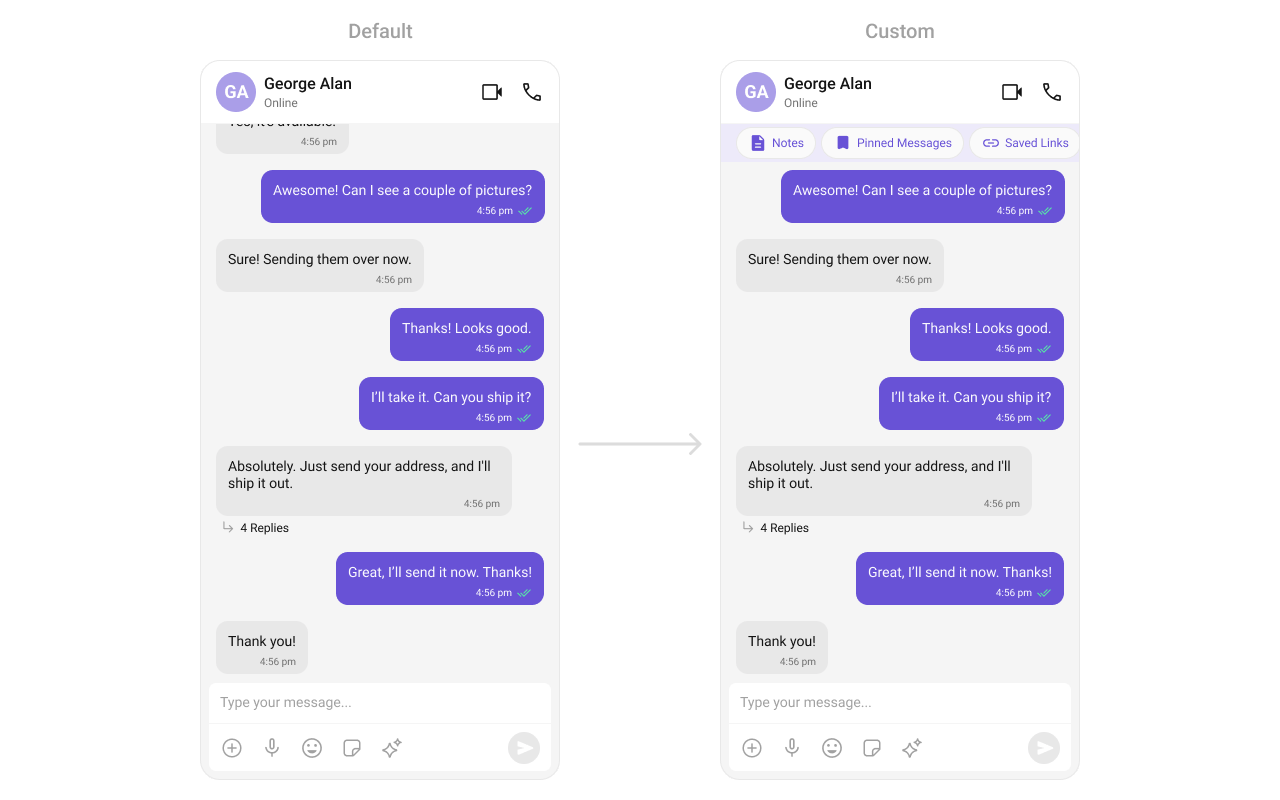 ```kotlin lines theme={null}
messageList.setHeaderView(View.inflate(context, R.layout.custom_header_layout, null))
```
```kotlin lines theme={null}
CometChatMessageList(
user = user,
headerView = {
Row {
Text("Notes")
Spacer(Modifier.width(8.dp))
Text("Pinned Messages")
}
}
)
```
### Footer View
Custom view displayed at the bottom of the message list.
```kotlin lines theme={null}
messageList.setHeaderView(View.inflate(context, R.layout.custom_header_layout, null))
```
```kotlin lines theme={null}
CometChatMessageList(
user = user,
headerView = {
Row {
Text("Notes")
Spacer(Modifier.width(8.dp))
Text("Pinned Messages")
}
}
)
```
### Footer View
Custom view displayed at the bottom of the message list.
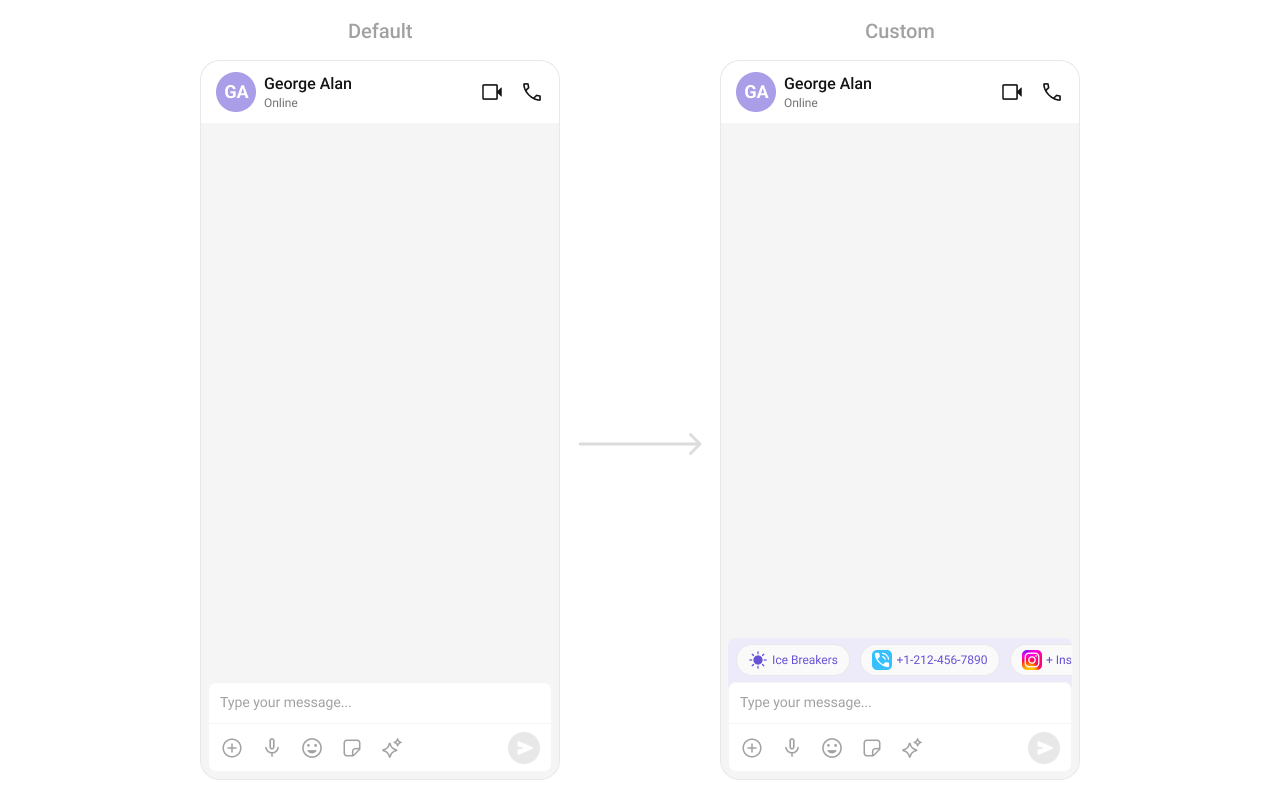 ```kotlin lines theme={null}
messageList.setFooterView(View.inflate(context, R.layout.custom_footer_layout, null))
```
```kotlin lines theme={null}
CometChatMessageList(
user = user,
footerView = {
Text("End of messages")
}
)
```
### State Views
```kotlin lines theme={null}
messageList.setEmptyView(customEmptyView)
messageList.setErrorView(customErrorView)
messageList.setLoadingView(customLoadingView)
```
```kotlin lines theme={null}
CometChatMessageList(
user = user,
emptyView = { Text("No messages yet") },
errorView = { onRetry -> Button(onClick = onRetry) { Text("Retry") } },
loadingView = { CircularProgressIndicator() }
)
```
### Text Formatters (Mentions)
```kotlin lines theme={null}
messageList.setFooterView(View.inflate(context, R.layout.custom_footer_layout, null))
```
```kotlin lines theme={null}
CometChatMessageList(
user = user,
footerView = {
Text("End of messages")
}
)
```
### State Views
```kotlin lines theme={null}
messageList.setEmptyView(customEmptyView)
messageList.setErrorView(customErrorView)
messageList.setLoadingView(customLoadingView)
```
```kotlin lines theme={null}
CometChatMessageList(
user = user,
emptyView = { Text("No messages yet") },
errorView = { onRetry -> Button(onClick = onRetry) { Text("Retry") } },
loadingView = { CircularProgressIndicator() }
)
```
### Text Formatters (Mentions)
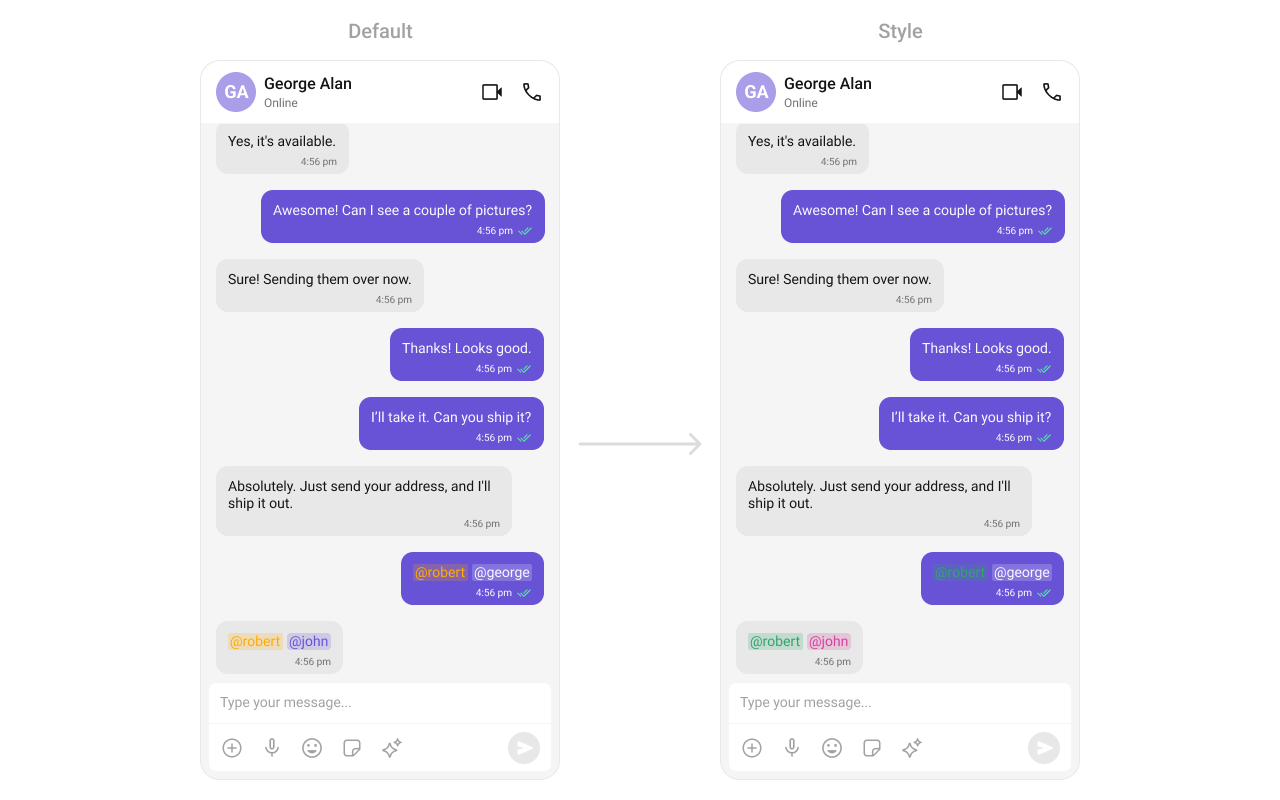 ```kotlin lines theme={null}
val mentionFormatter = CometChatMentionsFormatter(context)
mentionFormatter.setMessageListMentionTextStyle(context, R.style.CustomMentionsStyle)
val textFormatters: MutableList = ArrayList()
textFormatters.add(mentionFormatter)
messageList.setTextFormatters(textFormatters)
```
```kotlin lines theme={null}
val mentionFormatter = CometChatMentionsFormatter(context)
CometChatMessageList(
user = user,
textFormatters = listOf(mentionFormatter)
)
```
***
## Bubble Factory
`CometChatMessageList` uses a factory-based pattern to render message content. Each message type (text, image, video, etc.) has a corresponding `BubbleFactory` that creates and binds the bubble view. You can replace existing factories or register new ones for custom message types.
### How It Works
When a message is displayed, the list resolves a factory key from the message's `category` and `type` (e.g., `message_text`, `custom_location`). If a matching `BubbleFactory` is registered, it handles view creation and binding. Otherwise, the built-in `InternalContentRenderer` handles default rendering.
A `BubbleFactory` has two lifecycle phases:
1. `create*View(context)` — called once when the ViewHolder is created. The message object is **not** available at this point.
2. `bind*View(view, message, alignment, ...)` — called every time a message is displayed. This is where you populate the view with message data.
### Replacing an Existing Bubble Factory
Override how a built-in message type renders by registering a factory with the same category and type:
```kotlin lines theme={null}
class CustomTextBubbleFactory : BubbleFactory() {
override fun getCategory(): String = CometChatConstants.CATEGORY_MESSAGE
override fun getType(): String = CometChatConstants.MESSAGE_TYPE_TEXT
override fun createContentView(context: Context): View {
return TextView(context).apply {
setPadding(24, 16, 24, 16)
}
}
override fun bindContentView(
view: View,
message: BaseMessage,
alignment: UIKitConstants.MessageBubbleAlignment,
holder: RecyclerView.ViewHolder?,
position: Int
) {
(view as TextView).text = (message as? TextMessage)?.text ?: ""
}
}
// Replace the default text bubble
messageList.setBubbleFactories(listOf(CustomTextBubbleFactory()))
```
```kotlin lines theme={null}
class CustomTextBubbleFactory : BubbleFactory {
override fun getCategory(): String = CometChatConstants.CATEGORY_MESSAGE
override fun getType(): String = CometChatConstants.MESSAGE_TYPE_TEXT
override fun getContentView(
message: BaseMessage,
alignment: UIKitConstants.MessageBubbleAlignment,
style: CometChatMessageBubbleStyle,
textFormatters: List
): @Composable () -> Unit = {
Text(
text = (message as? TextMessage)?.text ?: "",
modifier = Modifier.padding(horizontal = 24.dp, vertical = 16.dp)
)
}
}
CometChatMessageList(
user = user,
bubbleFactories = listOf(CustomTextBubbleFactory())
)
```
### Adding a New Bubble Factory for Custom Messages
Register a factory for a custom message type that the SDK doesn't handle by default:
```kotlin lines theme={null}
class LocationBubbleFactory : BubbleFactory() {
override fun getCategory(): String = CometChatConstants.CATEGORY_CUSTOM
override fun getType(): String = "location"
override fun createContentView(context: Context): View {
return LayoutInflater.from(context)
.inflate(R.layout.bubble_location, null)
}
override fun bindContentView(
view: View,
message: BaseMessage,
alignment: UIKitConstants.MessageBubbleAlignment,
holder: RecyclerView.ViewHolder?,
position: Int
) {
val customMessage = message as? CustomMessage ?: return
val lat = customMessage.customData?.optDouble("latitude") ?: 0.0
val lng = customMessage.customData?.optDouble("longitude") ?: 0.0
view.findViewById(R.id.tv_coordinates).text = "$lat, $lng"
}
}
messageList.setBubbleFactories(listOf(LocationBubbleFactory()))
```
```kotlin lines theme={null}
class LocationBubbleFactory : BubbleFactory {
override fun getCategory(): String = CometChatConstants.CATEGORY_CUSTOM
override fun getType(): String = "location"
override fun getContentView(
message: BaseMessage,
alignment: UIKitConstants.MessageBubbleAlignment,
style: CometChatMessageBubbleStyle,
textFormatters: List
): @Composable () -> Unit = {
val customMessage = message as? CustomMessage
val lat = customMessage?.customData?.optDouble("latitude") ?: 0.0
val lng = customMessage?.customData?.optDouble("longitude") ?: 0.0
Text(text = "$lat, $lng")
}
}
CometChatMessageList(
user = user,
bubbleFactories = listOf(LocationBubbleFactory())
)
```
### Replacing the Entire Bubble
Override `getBubbleView` to replace the entire message bubble (including all slots like header, footer, avatar) instead of just the content area:
```kotlin lines theme={null}
class FullCustomBubbleFactory : BubbleFactory() {
override fun getCategory(): String = CometChatConstants.CATEGORY_CUSTOM
override fun getType(): String = "meeting"
override fun createBubbleView(context: Context): View {
return LayoutInflater.from(context)
.inflate(R.layout.bubble_meeting_full, null)
}
override fun bindBubbleView(
view: View,
message: BaseMessage,
alignment: UIKitConstants.MessageBubbleAlignment,
holder: RecyclerView.ViewHolder?,
position: Int
) {
val customMessage = message as? CustomMessage ?: return
view.findViewById(R.id.tv_meeting_title).text =
customMessage.customData?.optString("title") ?: "Meeting"
}
}
messageList.setBubbleFactories(listOf(FullCustomBubbleFactory()))
```
```kotlin lines theme={null}
class FullCustomBubbleFactory : BubbleFactory {
override fun getCategory(): String = CometChatConstants.CATEGORY_CUSTOM
override fun getType(): String = "meeting"
override fun getBubbleView(
message: BaseMessage,
alignment: UIKitConstants.MessageBubbleAlignment
): (@Composable () -> Unit)? = {
val customMessage = message as? CustomMessage
val title = customMessage?.customData?.optString("title") ?: "Meeting"
Text(text = title)
}
}
CometChatMessageList(
user = user,
bubbleFactories = listOf(FullCustomBubbleFactory())
)
```
### Bubble Slot Reference
Each `BubbleFactory` can override individual slots within the bubble:
| Slot | Create Method | Bind Method | Description |
| ------------- | ------------------------ | ---------------------- | ----------------------------------------------------------------------- |
| Bubble (full) | `createBubbleView()` | `bindBubbleView()` | Replaces the entire bubble. When non-null, all other slots are ignored. |
| Content | `createContentView()` | `bindContentView()` | Main message content (required). |
| Leading | `createLeadingView()` | `bindLeadingView()` | Avatar area on the left side. |
| Header | `createHeaderView()` | `bindHeaderView()` | Sender name and timestamp. |
| Reply | `createReplyView()` | `bindReplyView()` | Quoted/reply-to message preview. |
| Bottom | `createBottomView()` | `bindBottomView()` | Below content (e.g., moderation). |
| Status Info | `createStatusInfoView()` | `bindStatusInfoView()` | Timestamp and read receipts. |
| Thread | `createThreadView()` | `bindThreadView()` | Threaded replies indicator. |
| Footer | `createFooterView()` | `bindFooterView()` | Reactions and additional footer content. |
| Slot | Method | Description |
| ------------- | --------------------- | ----------------------------------------------------------------------- |
| Bubble (full) | `getBubbleView()` | Replaces the entire bubble. When non-null, all other slots are ignored. |
| Content | `getContentView()` | Main message content (required). |
| Leading | `getLeadingView()` | Avatar area on the left side. |
| Header | `getHeaderView()` | Sender name and timestamp. |
| Reply | `getReplyView()` | Quoted/reply-to message preview. |
| Bottom | `getBottomView()` | Below content (e.g., moderation). |
| Status Info | `getStatusInfoView()` | Timestamp and read receipts. |
| Thread | `getThreadView()` | Threaded replies indicator. |
| Footer | `getFooterView()` | Reactions and additional footer content. |
***
## Bubble Slot View Providers
While `BubbleFactory` customizes rendering per message type, slot view providers let you override a specific slot across all message types. This is useful when you want consistent customization (e.g., always show a custom avatar or always add a custom footer) regardless of the message type.
Slot view providers take priority over `BubbleFactory` slot methods. If both are set, the provider wins.
Use `BubbleViewProvider` — an interface with `createView()` (called once per ViewHolder) and `bindView()` (called each time a message binds):
```kotlin lines theme={null}
// Custom leading view (avatar) for all messages
messageList.setLeadingViewProvider(object : BubbleViewProvider {
override fun createView(
context: Context,
message: BaseMessage,
alignment: UIKitConstants.MessageBubbleAlignment
): View? {
return if (alignment == UIKitConstants.MessageBubbleAlignment.LEFT) {
CometChatAvatar(context)
} else null
}
override fun bindView(
view: View,
message: BaseMessage,
alignment: UIKitConstants.MessageBubbleAlignment
) {
(view as? CometChatAvatar)?.setUser(message.sender)
}
})
// Custom status info view for all messages
messageList.setStatusInfoViewProvider(object : BubbleViewProvider {
override fun createView(
context: Context,
message: BaseMessage,
alignment: UIKitConstants.MessageBubbleAlignment
): View? {
return TextView(context).apply { textSize = 10f }
}
override fun bindView(
view: View,
message: BaseMessage,
alignment: UIKitConstants.MessageBubbleAlignment
) {
(view as? TextView)?.text = formatTimestamp(message.sentAt)
}
})
```
Available provider setters:
| Method | Slot |
| ----------------------------- | -------------------------------------- |
| `setLeadingViewProvider()` | Avatar area |
| `setHeaderViewProvider()` | Sender name / timestamp |
| `setReplyViewProvider()` | Reply-to preview |
| `setContentViewProvider()` | Main content (overrides all factories) |
| `setBottomViewProvider()` | Below content (moderation) |
| `setStatusInfoViewProvider()` | Timestamp / receipts |
| `setThreadViewProvider()` | Thread replies indicator |
| `setFooterViewProvider()` | Reactions / footer |
Pass composable lambdas that receive the message and its alignment:
```kotlin lines theme={null}
CometChatMessageList(
user = user,
leadingView = { message, alignment ->
if (alignment == UIKitConstants.MessageBubbleAlignment.LEFT) {
CometChatAvatar(user = message.sender)
}
},
statusInfoView = { message, alignment ->
Text(
text = formatTimestamp(message.sentAt),
style = CometChatTheme.typography.caption1Regular
)
},
footerView = { message, alignment ->
// Custom reactions display
MessageReactions(message = message)
}
)
```
Available slot parameters:
| Parameter | Type | Slot |
| ---------------- | ----------------------------------------------------- | -------------------------------------- |
| `leadingView` | `@Composable (BaseMessage, MessageAlignment) -> Unit` | Avatar area |
| `headerView` | `@Composable (BaseMessage, MessageAlignment) -> Unit` | Sender name / timestamp |
| `replyView` | `@Composable (BaseMessage, MessageAlignment) -> Unit` | Reply-to preview |
| `contentView` | `@Composable (BaseMessage, MessageAlignment) -> Unit` | Main content (overrides all factories) |
| `bottomView` | `@Composable (BaseMessage, MessageAlignment) -> Unit` | Below content (moderation) |
| `statusInfoView` | `@Composable (BaseMessage, MessageAlignment) -> Unit` | Timestamp / receipts |
| `threadView` | `@Composable (BaseMessage, MessageAlignment) -> Unit` | Thread replies indicator |
| `footerView` | `@Composable (BaseMessage, MessageAlignment) -> Unit` | Reactions / footer |
***
## Message Options
Message options are the contextual actions shown when a user long-presses a message bubble (e.g., Reply, Copy, Edit, Delete). You can control their visibility, replace the entire options list, or append custom options.
### Toggling Default Option Visibility
Each built-in option has a visibility setter. Pass `View.VISIBLE` or `View.GONE`:
```kotlin lines theme={null}
// Hide specific options
messageList.setDeleteMessageOptionVisibility(View.GONE)
messageList.setEditMessageOptionVisibility(View.GONE)
messageList.setTranslateMessageOptionVisibility(View.GONE)
// Show an option that's hidden by default
messageList.setMarkAsUnreadOptionVisibility(View.VISIBLE)
```
```kotlin lines theme={null}
CometChatMessageList(
user = user,
hideDeleteOption = true,
hideEditOption = true,
hideTranslateOption = true,
showMarkAsUnreadOption = true
)
```
Available visibility methods (Kotlin XML):
| Method | Default | Description |
| --------------------------------------- | --------- | ----------------- |
| `setReplyInThreadOptionVisibility()` | `VISIBLE` | Reply in thread |
| `setReplyOptionVisibility()` | `VISIBLE` | Reply to message |
| `setCopyMessageOptionVisibility()` | `VISIBLE` | Copy message text |
| `setEditMessageOptionVisibility()` | `VISIBLE` | Edit sent message |
| `setDeleteMessageOptionVisibility()` | `VISIBLE` | Delete message |
| `setMessageReactionOptionVisibility()` | `VISIBLE` | Add reaction |
| `setMessageInfoOptionVisibility()` | `VISIBLE` | View message info |
| `setTranslateMessageOptionVisibility()` | `VISIBLE` | Translate message |
| `setShareMessageOptionVisibility()` | `VISIBLE` | Share message |
| `setMarkAsUnreadOptionVisibility()` | `GONE` | Mark as unread |
### Replacing All Options (`setOptions`)
Use `setOptions` to completely replace the default options for a message. Return a list to override, or `null` to fall back to defaults:
```kotlin lines theme={null}
messageList.setOptions { message ->
listOf(
CometChatMessageOption(
id = "custom_pin",
title = "Pin Message",
icon = R.drawable.ic_pin,
onClick = { pinMessage(message) }
),
CometChatMessageOption(
id = UIKitConstants.MessageOption.COPY,
title = context.getString(R.string.cometchat_copy),
icon = R.drawable.cometchat_ic_copy,
onClick = { copyMessage(message) }
)
)
}
```
```kotlin lines theme={null}
CometChatMessageList(
user = user,
options = { message ->
listOf(
CometChatMessageOption(
id = "custom_pin",
title = "Pin Message",
icon = R.drawable.ic_pin,
onClick = { pinMessage(message) }
),
CometChatMessageOption(
id = UIKitConstants.MessageOption.COPY,
title = context.getString(R.string.cometchat_copy),
icon = R.drawable.cometchat_ic_copy,
onClick = { copyMessage(message) }
)
)
}
)
```
> When `setOptions` returns a non-null list, `addOptions` is not invoked.
### Appending Custom Options (`addOptions`)
Use `addOptions` to append additional options after the default ones. This is invoked only when `setOptions` is not set or returns `null`:
```kotlin lines theme={null}
messageList.addOptions { message ->
listOf(
CometChatMessageOption(
id = "custom_bookmark",
title = "Bookmark",
icon = R.drawable.ic_bookmark,
onClick = { bookmarkMessage(message) }
),
CometChatMessageOption(
id = "custom_remind",
title = "Remind Me",
icon = R.drawable.ic_alarm,
onClick = { setReminder(message) }
)
)
}
```
```kotlin lines theme={null}
CometChatMessageList(
user = user,
addOptions = { message ->
listOf(
CometChatMessageOption(
id = "custom_bookmark",
title = "Bookmark",
icon = R.drawable.ic_bookmark,
onClick = { bookmarkMessage(message) }
),
CometChatMessageOption(
id = "custom_remind",
title = "Remind Me",
icon = R.drawable.ic_alarm,
onClick = { setReminder(message) }
)
)
}
)
```
### Conditional Options Per Message
Both `setOptions` and `addOptions` receive the `BaseMessage`, so you can return different options based on message type, sender, or any other condition:
```kotlin lines theme={null}
messageList.setOptions { message ->
when {
// Custom options for your own messages
message.sender?.uid == CometChat.getLoggedInUser()?.uid -> listOf(
CometChatMessageOption(id = "edit", title = "Edit", icon = R.drawable.cometchat_ic_edit),
CometChatMessageOption(id = "delete", title = "Delete", icon = R.drawable.cometchat_ic_delete)
)
// Default options for others' messages
else -> null
}
}
```
```kotlin lines theme={null}
CometChatMessageList(
user = user,
options = { message ->
when {
message.sender?.uid == CometChat.getLoggedInUser()?.uid -> listOf(
CometChatMessageOption(id = "edit", title = "Edit", icon = R.drawable.cometchat_ic_edit),
CometChatMessageOption(id = "delete", title = "Delete", icon = R.drawable.cometchat_ic_delete)
)
else -> null // fall back to defaults
}
}
)
```
### CometChatMessageOption Reference
| Property | Type | Description |
| ----------------- | ------------------ | -------------------------------------------------------------------------- |
| `id` | `String` | Unique identifier (use `UIKitConstants.MessageOption.*` for built-in IDs). |
| `title` | `String` | Display text for the option. |
| `titleColor` | `@ColorInt Int` | Text color (0 for default). |
| `icon` | `@DrawableRes Int` | Drawable resource for the option icon. |
| `iconTintColor` | `@ColorInt Int` | Icon tint color (0 for default). |
| `titleAppearance` | `@StyleRes Int` | Text appearance style resource. |
| `backgroundColor` | `@ColorInt Int` | Background color for the option row. |
| `onClick` | `(() -> Unit)?` | Callback invoked when the option is tapped. |
***
## Style
Define a custom style in `themes.xml`:
```xml themes.xml lines theme={null}
```
```kotlin lines theme={null}
CometChatMessageList(
user = user,
style = CometChatMessageListStyle.default().copy(
backgroundColor = Color(0xFFF5F5F5)
)
)
```
```kotlin lines theme={null}
val mentionFormatter = CometChatMentionsFormatter(context)
mentionFormatter.setMessageListMentionTextStyle(context, R.style.CustomMentionsStyle)
val textFormatters: MutableList = ArrayList()
textFormatters.add(mentionFormatter)
messageList.setTextFormatters(textFormatters)
```
```kotlin lines theme={null}
val mentionFormatter = CometChatMentionsFormatter(context)
CometChatMessageList(
user = user,
textFormatters = listOf(mentionFormatter)
)
```
***
## Bubble Factory
`CometChatMessageList` uses a factory-based pattern to render message content. Each message type (text, image, video, etc.) has a corresponding `BubbleFactory` that creates and binds the bubble view. You can replace existing factories or register new ones for custom message types.
### How It Works
When a message is displayed, the list resolves a factory key from the message's `category` and `type` (e.g., `message_text`, `custom_location`). If a matching `BubbleFactory` is registered, it handles view creation and binding. Otherwise, the built-in `InternalContentRenderer` handles default rendering.
A `BubbleFactory` has two lifecycle phases:
1. `create*View(context)` — called once when the ViewHolder is created. The message object is **not** available at this point.
2. `bind*View(view, message, alignment, ...)` — called every time a message is displayed. This is where you populate the view with message data.
### Replacing an Existing Bubble Factory
Override how a built-in message type renders by registering a factory with the same category and type:
```kotlin lines theme={null}
class CustomTextBubbleFactory : BubbleFactory() {
override fun getCategory(): String = CometChatConstants.CATEGORY_MESSAGE
override fun getType(): String = CometChatConstants.MESSAGE_TYPE_TEXT
override fun createContentView(context: Context): View {
return TextView(context).apply {
setPadding(24, 16, 24, 16)
}
}
override fun bindContentView(
view: View,
message: BaseMessage,
alignment: UIKitConstants.MessageBubbleAlignment,
holder: RecyclerView.ViewHolder?,
position: Int
) {
(view as TextView).text = (message as? TextMessage)?.text ?: ""
}
}
// Replace the default text bubble
messageList.setBubbleFactories(listOf(CustomTextBubbleFactory()))
```
```kotlin lines theme={null}
class CustomTextBubbleFactory : BubbleFactory {
override fun getCategory(): String = CometChatConstants.CATEGORY_MESSAGE
override fun getType(): String = CometChatConstants.MESSAGE_TYPE_TEXT
override fun getContentView(
message: BaseMessage,
alignment: UIKitConstants.MessageBubbleAlignment,
style: CometChatMessageBubbleStyle,
textFormatters: List
): @Composable () -> Unit = {
Text(
text = (message as? TextMessage)?.text ?: "",
modifier = Modifier.padding(horizontal = 24.dp, vertical = 16.dp)
)
}
}
CometChatMessageList(
user = user,
bubbleFactories = listOf(CustomTextBubbleFactory())
)
```
### Adding a New Bubble Factory for Custom Messages
Register a factory for a custom message type that the SDK doesn't handle by default:
```kotlin lines theme={null}
class LocationBubbleFactory : BubbleFactory() {
override fun getCategory(): String = CometChatConstants.CATEGORY_CUSTOM
override fun getType(): String = "location"
override fun createContentView(context: Context): View {
return LayoutInflater.from(context)
.inflate(R.layout.bubble_location, null)
}
override fun bindContentView(
view: View,
message: BaseMessage,
alignment: UIKitConstants.MessageBubbleAlignment,
holder: RecyclerView.ViewHolder?,
position: Int
) {
val customMessage = message as? CustomMessage ?: return
val lat = customMessage.customData?.optDouble("latitude") ?: 0.0
val lng = customMessage.customData?.optDouble("longitude") ?: 0.0
view.findViewById(R.id.tv_coordinates).text = "$lat, $lng"
}
}
messageList.setBubbleFactories(listOf(LocationBubbleFactory()))
```
```kotlin lines theme={null}
class LocationBubbleFactory : BubbleFactory {
override fun getCategory(): String = CometChatConstants.CATEGORY_CUSTOM
override fun getType(): String = "location"
override fun getContentView(
message: BaseMessage,
alignment: UIKitConstants.MessageBubbleAlignment,
style: CometChatMessageBubbleStyle,
textFormatters: List
): @Composable () -> Unit = {
val customMessage = message as? CustomMessage
val lat = customMessage?.customData?.optDouble("latitude") ?: 0.0
val lng = customMessage?.customData?.optDouble("longitude") ?: 0.0
Text(text = "$lat, $lng")
}
}
CometChatMessageList(
user = user,
bubbleFactories = listOf(LocationBubbleFactory())
)
```
### Replacing the Entire Bubble
Override `getBubbleView` to replace the entire message bubble (including all slots like header, footer, avatar) instead of just the content area:
```kotlin lines theme={null}
class FullCustomBubbleFactory : BubbleFactory() {
override fun getCategory(): String = CometChatConstants.CATEGORY_CUSTOM
override fun getType(): String = "meeting"
override fun createBubbleView(context: Context): View {
return LayoutInflater.from(context)
.inflate(R.layout.bubble_meeting_full, null)
}
override fun bindBubbleView(
view: View,
message: BaseMessage,
alignment: UIKitConstants.MessageBubbleAlignment,
holder: RecyclerView.ViewHolder?,
position: Int
) {
val customMessage = message as? CustomMessage ?: return
view.findViewById(R.id.tv_meeting_title).text =
customMessage.customData?.optString("title") ?: "Meeting"
}
}
messageList.setBubbleFactories(listOf(FullCustomBubbleFactory()))
```
```kotlin lines theme={null}
class FullCustomBubbleFactory : BubbleFactory {
override fun getCategory(): String = CometChatConstants.CATEGORY_CUSTOM
override fun getType(): String = "meeting"
override fun getBubbleView(
message: BaseMessage,
alignment: UIKitConstants.MessageBubbleAlignment
): (@Composable () -> Unit)? = {
val customMessage = message as? CustomMessage
val title = customMessage?.customData?.optString("title") ?: "Meeting"
Text(text = title)
}
}
CometChatMessageList(
user = user,
bubbleFactories = listOf(FullCustomBubbleFactory())
)
```
### Bubble Slot Reference
Each `BubbleFactory` can override individual slots within the bubble:
| Slot | Create Method | Bind Method | Description |
| ------------- | ------------------------ | ---------------------- | ----------------------------------------------------------------------- |
| Bubble (full) | `createBubbleView()` | `bindBubbleView()` | Replaces the entire bubble. When non-null, all other slots are ignored. |
| Content | `createContentView()` | `bindContentView()` | Main message content (required). |
| Leading | `createLeadingView()` | `bindLeadingView()` | Avatar area on the left side. |
| Header | `createHeaderView()` | `bindHeaderView()` | Sender name and timestamp. |
| Reply | `createReplyView()` | `bindReplyView()` | Quoted/reply-to message preview. |
| Bottom | `createBottomView()` | `bindBottomView()` | Below content (e.g., moderation). |
| Status Info | `createStatusInfoView()` | `bindStatusInfoView()` | Timestamp and read receipts. |
| Thread | `createThreadView()` | `bindThreadView()` | Threaded replies indicator. |
| Footer | `createFooterView()` | `bindFooterView()` | Reactions and additional footer content. |
| Slot | Method | Description |
| ------------- | --------------------- | ----------------------------------------------------------------------- |
| Bubble (full) | `getBubbleView()` | Replaces the entire bubble. When non-null, all other slots are ignored. |
| Content | `getContentView()` | Main message content (required). |
| Leading | `getLeadingView()` | Avatar area on the left side. |
| Header | `getHeaderView()` | Sender name and timestamp. |
| Reply | `getReplyView()` | Quoted/reply-to message preview. |
| Bottom | `getBottomView()` | Below content (e.g., moderation). |
| Status Info | `getStatusInfoView()` | Timestamp and read receipts. |
| Thread | `getThreadView()` | Threaded replies indicator. |
| Footer | `getFooterView()` | Reactions and additional footer content. |
***
## Bubble Slot View Providers
While `BubbleFactory` customizes rendering per message type, slot view providers let you override a specific slot across all message types. This is useful when you want consistent customization (e.g., always show a custom avatar or always add a custom footer) regardless of the message type.
Slot view providers take priority over `BubbleFactory` slot methods. If both are set, the provider wins.
Use `BubbleViewProvider` — an interface with `createView()` (called once per ViewHolder) and `bindView()` (called each time a message binds):
```kotlin lines theme={null}
// Custom leading view (avatar) for all messages
messageList.setLeadingViewProvider(object : BubbleViewProvider {
override fun createView(
context: Context,
message: BaseMessage,
alignment: UIKitConstants.MessageBubbleAlignment
): View? {
return if (alignment == UIKitConstants.MessageBubbleAlignment.LEFT) {
CometChatAvatar(context)
} else null
}
override fun bindView(
view: View,
message: BaseMessage,
alignment: UIKitConstants.MessageBubbleAlignment
) {
(view as? CometChatAvatar)?.setUser(message.sender)
}
})
// Custom status info view for all messages
messageList.setStatusInfoViewProvider(object : BubbleViewProvider {
override fun createView(
context: Context,
message: BaseMessage,
alignment: UIKitConstants.MessageBubbleAlignment
): View? {
return TextView(context).apply { textSize = 10f }
}
override fun bindView(
view: View,
message: BaseMessage,
alignment: UIKitConstants.MessageBubbleAlignment
) {
(view as? TextView)?.text = formatTimestamp(message.sentAt)
}
})
```
Available provider setters:
| Method | Slot |
| ----------------------------- | -------------------------------------- |
| `setLeadingViewProvider()` | Avatar area |
| `setHeaderViewProvider()` | Sender name / timestamp |
| `setReplyViewProvider()` | Reply-to preview |
| `setContentViewProvider()` | Main content (overrides all factories) |
| `setBottomViewProvider()` | Below content (moderation) |
| `setStatusInfoViewProvider()` | Timestamp / receipts |
| `setThreadViewProvider()` | Thread replies indicator |
| `setFooterViewProvider()` | Reactions / footer |
Pass composable lambdas that receive the message and its alignment:
```kotlin lines theme={null}
CometChatMessageList(
user = user,
leadingView = { message, alignment ->
if (alignment == UIKitConstants.MessageBubbleAlignment.LEFT) {
CometChatAvatar(user = message.sender)
}
},
statusInfoView = { message, alignment ->
Text(
text = formatTimestamp(message.sentAt),
style = CometChatTheme.typography.caption1Regular
)
},
footerView = { message, alignment ->
// Custom reactions display
MessageReactions(message = message)
}
)
```
Available slot parameters:
| Parameter | Type | Slot |
| ---------------- | ----------------------------------------------------- | -------------------------------------- |
| `leadingView` | `@Composable (BaseMessage, MessageAlignment) -> Unit` | Avatar area |
| `headerView` | `@Composable (BaseMessage, MessageAlignment) -> Unit` | Sender name / timestamp |
| `replyView` | `@Composable (BaseMessage, MessageAlignment) -> Unit` | Reply-to preview |
| `contentView` | `@Composable (BaseMessage, MessageAlignment) -> Unit` | Main content (overrides all factories) |
| `bottomView` | `@Composable (BaseMessage, MessageAlignment) -> Unit` | Below content (moderation) |
| `statusInfoView` | `@Composable (BaseMessage, MessageAlignment) -> Unit` | Timestamp / receipts |
| `threadView` | `@Composable (BaseMessage, MessageAlignment) -> Unit` | Thread replies indicator |
| `footerView` | `@Composable (BaseMessage, MessageAlignment) -> Unit` | Reactions / footer |
***
## Message Options
Message options are the contextual actions shown when a user long-presses a message bubble (e.g., Reply, Copy, Edit, Delete). You can control their visibility, replace the entire options list, or append custom options.
### Toggling Default Option Visibility
Each built-in option has a visibility setter. Pass `View.VISIBLE` or `View.GONE`:
```kotlin lines theme={null}
// Hide specific options
messageList.setDeleteMessageOptionVisibility(View.GONE)
messageList.setEditMessageOptionVisibility(View.GONE)
messageList.setTranslateMessageOptionVisibility(View.GONE)
// Show an option that's hidden by default
messageList.setMarkAsUnreadOptionVisibility(View.VISIBLE)
```
```kotlin lines theme={null}
CometChatMessageList(
user = user,
hideDeleteOption = true,
hideEditOption = true,
hideTranslateOption = true,
showMarkAsUnreadOption = true
)
```
Available visibility methods (Kotlin XML):
| Method | Default | Description |
| --------------------------------------- | --------- | ----------------- |
| `setReplyInThreadOptionVisibility()` | `VISIBLE` | Reply in thread |
| `setReplyOptionVisibility()` | `VISIBLE` | Reply to message |
| `setCopyMessageOptionVisibility()` | `VISIBLE` | Copy message text |
| `setEditMessageOptionVisibility()` | `VISIBLE` | Edit sent message |
| `setDeleteMessageOptionVisibility()` | `VISIBLE` | Delete message |
| `setMessageReactionOptionVisibility()` | `VISIBLE` | Add reaction |
| `setMessageInfoOptionVisibility()` | `VISIBLE` | View message info |
| `setTranslateMessageOptionVisibility()` | `VISIBLE` | Translate message |
| `setShareMessageOptionVisibility()` | `VISIBLE` | Share message |
| `setMarkAsUnreadOptionVisibility()` | `GONE` | Mark as unread |
### Replacing All Options (`setOptions`)
Use `setOptions` to completely replace the default options for a message. Return a list to override, or `null` to fall back to defaults:
```kotlin lines theme={null}
messageList.setOptions { message ->
listOf(
CometChatMessageOption(
id = "custom_pin",
title = "Pin Message",
icon = R.drawable.ic_pin,
onClick = { pinMessage(message) }
),
CometChatMessageOption(
id = UIKitConstants.MessageOption.COPY,
title = context.getString(R.string.cometchat_copy),
icon = R.drawable.cometchat_ic_copy,
onClick = { copyMessage(message) }
)
)
}
```
```kotlin lines theme={null}
CometChatMessageList(
user = user,
options = { message ->
listOf(
CometChatMessageOption(
id = "custom_pin",
title = "Pin Message",
icon = R.drawable.ic_pin,
onClick = { pinMessage(message) }
),
CometChatMessageOption(
id = UIKitConstants.MessageOption.COPY,
title = context.getString(R.string.cometchat_copy),
icon = R.drawable.cometchat_ic_copy,
onClick = { copyMessage(message) }
)
)
}
)
```
> When `setOptions` returns a non-null list, `addOptions` is not invoked.
### Appending Custom Options (`addOptions`)
Use `addOptions` to append additional options after the default ones. This is invoked only when `setOptions` is not set or returns `null`:
```kotlin lines theme={null}
messageList.addOptions { message ->
listOf(
CometChatMessageOption(
id = "custom_bookmark",
title = "Bookmark",
icon = R.drawable.ic_bookmark,
onClick = { bookmarkMessage(message) }
),
CometChatMessageOption(
id = "custom_remind",
title = "Remind Me",
icon = R.drawable.ic_alarm,
onClick = { setReminder(message) }
)
)
}
```
```kotlin lines theme={null}
CometChatMessageList(
user = user,
addOptions = { message ->
listOf(
CometChatMessageOption(
id = "custom_bookmark",
title = "Bookmark",
icon = R.drawable.ic_bookmark,
onClick = { bookmarkMessage(message) }
),
CometChatMessageOption(
id = "custom_remind",
title = "Remind Me",
icon = R.drawable.ic_alarm,
onClick = { setReminder(message) }
)
)
}
)
```
### Conditional Options Per Message
Both `setOptions` and `addOptions` receive the `BaseMessage`, so you can return different options based on message type, sender, or any other condition:
```kotlin lines theme={null}
messageList.setOptions { message ->
when {
// Custom options for your own messages
message.sender?.uid == CometChat.getLoggedInUser()?.uid -> listOf(
CometChatMessageOption(id = "edit", title = "Edit", icon = R.drawable.cometchat_ic_edit),
CometChatMessageOption(id = "delete", title = "Delete", icon = R.drawable.cometchat_ic_delete)
)
// Default options for others' messages
else -> null
}
}
```
```kotlin lines theme={null}
CometChatMessageList(
user = user,
options = { message ->
when {
message.sender?.uid == CometChat.getLoggedInUser()?.uid -> listOf(
CometChatMessageOption(id = "edit", title = "Edit", icon = R.drawable.cometchat_ic_edit),
CometChatMessageOption(id = "delete", title = "Delete", icon = R.drawable.cometchat_ic_delete)
)
else -> null // fall back to defaults
}
}
)
```
### CometChatMessageOption Reference
| Property | Type | Description |
| ----------------- | ------------------ | -------------------------------------------------------------------------- |
| `id` | `String` | Unique identifier (use `UIKitConstants.MessageOption.*` for built-in IDs). |
| `title` | `String` | Display text for the option. |
| `titleColor` | `@ColorInt Int` | Text color (0 for default). |
| `icon` | `@DrawableRes Int` | Drawable resource for the option icon. |
| `iconTintColor` | `@ColorInt Int` | Icon tint color (0 for default). |
| `titleAppearance` | `@StyleRes Int` | Text appearance style resource. |
| `backgroundColor` | `@ColorInt Int` | Background color for the option row. |
| `onClick` | `(() -> Unit)?` | Callback invoked when the option is tapped. |
***
## Style
Define a custom style in `themes.xml`:
```xml themes.xml lines theme={null}
```
```kotlin lines theme={null}
CometChatMessageList(
user = user,
style = CometChatMessageListStyle.default().copy(
backgroundColor = Color(0xFFF5F5F5)
)
)
```
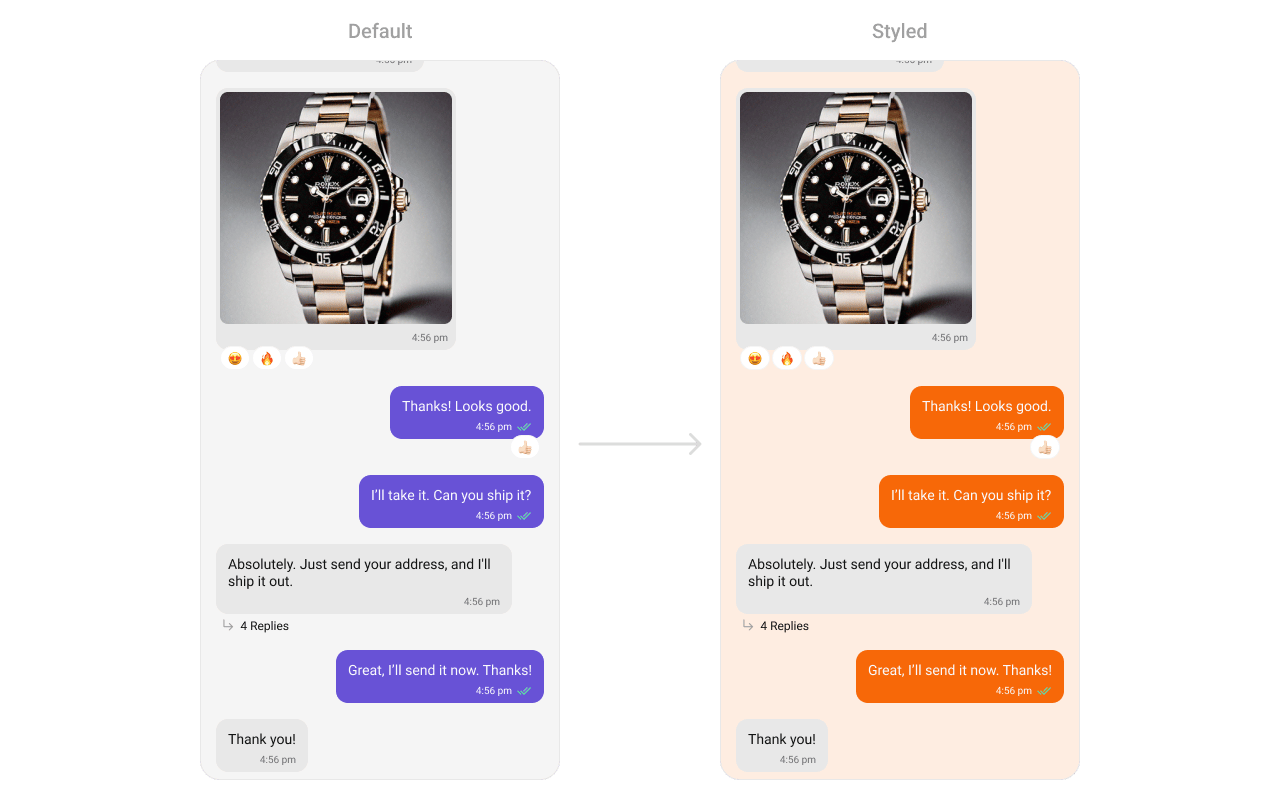 See [Component Styling](/ui-kit/android/v6/component-styling) for the full reference.
***
## ViewModel
```kotlin lines theme={null}
val viewModel = ViewModelProvider(this)
.get(CometChatMessageListViewModel::class.java)
```
```kotlin lines theme={null}
messageList.setViewModel(viewModel)
```
```kotlin lines theme={null}
CometChatMessageList(
user = user,
messageListViewModel = viewModel
)
```
See [ViewModel & Data](/ui-kit/android/v6/customization-viewmodel-data) for state observation and custom repositories.
***
## Next Steps
Display user/group info in the toolbar
Rich input for sending messages
Customize message bubble structure
Detailed styling reference
See [Component Styling](/ui-kit/android/v6/component-styling) for the full reference.
***
## ViewModel
```kotlin lines theme={null}
val viewModel = ViewModelProvider(this)
.get(CometChatMessageListViewModel::class.java)
```
```kotlin lines theme={null}
messageList.setViewModel(viewModel)
```
```kotlin lines theme={null}
CometChatMessageList(
user = user,
messageListViewModel = viewModel
)
```
See [ViewModel & Data](/ui-kit/android/v6/customization-viewmodel-data) for state observation and custom repositories.
***
## Next Steps
Display user/group info in the toolbar
Rich input for sending messages
Customize message bubble structure
Detailed styling reference